
Show HN: What if your menu bar was a keyboard-controlled command center?
pugdogdev Saturday, January 17, 2026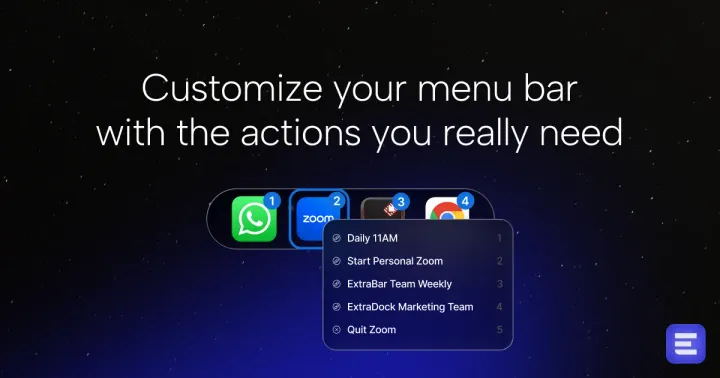
Hey Hacker News The ones that know me here know that I am a productivity geek.
After DockFlow to manage my Dock and ExtraDock, which gives me more space to manage my apps and files, I decided to tackle the macOS big boss: the menu bar.
I spend ~40% of my day context-switching between apps — Zoom meetings, Slack channels, Code projects, and Figma designs. My macOS menu bar has too many useless icons I almost never use.
So I thought to myself, how can I use this area to improve my workflows?
Most solutions (Bartender, Ice) require screen recording permissions, and did not really solve my issues. I wanted custom menus in the apps, not the ones that the developers decided for me.
After a few iterations and exploring different solutions, ExtraBar was created. Instead of just hiding icons, what if the menu bar became a keyboard-controlled command center that has the actions I need? No permissions. No telemetry. Just local actions.
This is ExtraBar: Set up the menu with the apps and actions YOU need, and use a hotkey to bring it up with full keyboard navigation built in.
What you can do: - Jump into your next Zoom call with a keystroke - Open specific Slack channels instantly (no menu clicking) - Launch VS Code projects directly - Trigger Apple Shortcuts workflows - Integrate with Raycast for advanced automation - Custom deep links to Figma, Spotify, or any URL
Real-world example: I've removed my menu bar icons. Everything is keyboard- controlled: cmd+B → 2 (Zoom) → 4 (my personal meeting) → I'm in.
Why it's different: Bartender and Ice hide icons. ExtraBar uses your menu bar to do things. Bartender requires screen recording permissions. Ice requires accessibility permissions. ExtraBar works offline with zero permissions - (Enhance functionality with only accessibility permissions, not a must)
Technical: - Written in SwiftUI; native on Apple Silicon and Intel - Zero OS permissions required (optional accessibility for enhanced keyboard nav) - All data stored locally (no cloud, no telemetry) - Very Customizable with custom configuration built in for popular apps + fully customizable configuration actions. - Import/export action configurations
The app is improving weekly based on community feedback. We're also building configuration sharing so users can share setups.
Already got some great feedback from Reddit and Producthunt, and I can't wait to get yours!
Check out the website: https://extrabar.app ProductHunt: https://www.producthunt.com/products/extrabar