
Show HN: I built an all-in-one API client, DB client and Data inspector
anlac96_it Thursday, February 05, 2026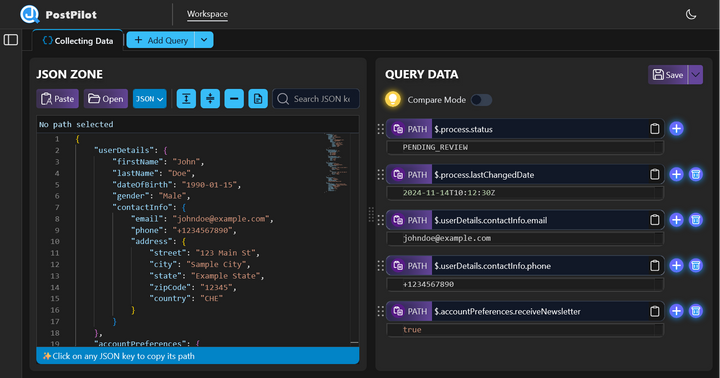
Switching between Postman and Dbeaver, then any random JSON viewer, PDF parser online is boring and frustrating - especially when you have to test the same case again and again.
So I built an all-in-one API client, DB client, and Data Inspector.
What you can do with it:
1. Data inspector tool
It all started as a simple web tool for running multiple JSON queries. When I work with REST APIs, I get tired of testing the same endpoint and searching for the same set of fields over and over with Ctrl+F.
Main features: - Support JSON, XML, or base64 encoded JSON - Search by key, value - Format/minify - Multiple JSONPath query - Data preview (Image, PDF, Table)
2. API Client
Copying API responses into the Data Inspector manually was still a pain, so I added a built-in API client and integrated the Data Inspector right into it.
Now you can inspect responses instantly without switching tools.
3. DB client
Copying data (usually otpCode or some kind of secret you can't get from REST APIs) from a DB tool to the API client is boring. Same thing when you need to copy an object ID from an API response and query it in the database.
So I added a simple DB client. Nothing fancy - just a schema explorer and SQL query support.
4. Shared variables
All parts of the app - API client, DB client, and Data Inspector - can extract and reuse shared variables, just like Postman.
---
So yeah, what started as a small JSON tool slowly grew into a full dev tool. The goal is simple - make daily dev tasks less annoying.
Small note on downloads: the app is still early and doesn't have many users yet, so you might see a security warning during download. The Windows version is signed with my personal Individual Certificate, so you'll see "Lac Tran An" as the publisher.
It comes with a 14-day free trial (no credit card needed), and there's an early bird $40 lifetime license.
I'd really appreciate any feedback - especially what feels useful or annoying. Hope it helps with your daily workflow.
Thanks for reading.