
Show HN: CC Usage Bar – Check Claude Code usage from your macOS menu bar
root-cause Saturday, March 07, 2026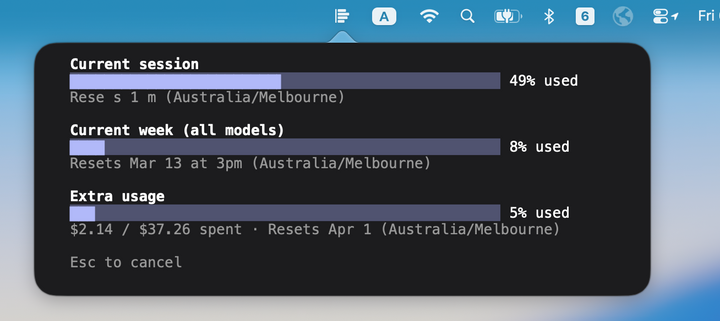
I built a small macOS menu bar app that lets you check your Claude Code subscription usage with a single click, without touching your terminal.
## The problem
If you use Claude Code heavily, you probably run multiple sessions across multiple terminal windows. When you want to check how much of your usage limit you've burned through, your only option is to type `/usage` inside a Claude Code session. That means either:
1. *Interrupting a running agent* mid-task to type a command, or 2. *Opening a new terminal and starting a new session* just to check a number
Both are disruptive. You lose flow, and the agent loses context.
## Why not just call the usage API?
A lot of community tools solve this by grabbing the OAuth token that Claude Code stores in the macOS Keychain and calling Anthropic's usage API directly. This works, but it has a real UX and security cost: *macOS will prompt you every time a third-party app tries to read that Keychain item.* You get a system dialog asking whether to allow access, sometimes repeatedly. It's not a smooth experience, and handing your OAuth token to another process is a legitimate security concern.
## How CC Usage Bar works differently
CC Usage Bar takes a simpler, zero-trust approach. It doesn't touch your Keychain, doesn't make any network calls itself, and doesn't parse or store any credentials. Instead, when you click the menu bar icon, it:
1. Spawns a real Claude Code session in a pseudo-terminal (PTY) 2. Sends the `/usage` command 3. Captures and renders the output with full ANSI color fidelity 4. Terminates the session immediately
It literally runs `claude` the same way you would, just in a hidden terminal. The data comes straight from Claude Code itself, so it's always accurate and reflects the latest state. No reverse engineering, no API scraping, no hacks.
## What it looks like
A single icon in your menu bar. Left-click to open a popover showing your current usage. Click outside to dismiss. That's it.
- Native Swift/SwiftUI app, runs as a lightweight menu bar agent (no Dock icon) - macOS 14 Sonoma or later - Requires Claude Code already installed and on your PATH
## Links
- GitHub: https://github.com/yilei-he/cc-usage-bar (MIT licensed) - Download pre-built .app from the Releases page, or build from source with Xcode
Happy to hear feedback or ideas. If you've been annoyed by the same workflow interruption, give it a try.